
A GHL contact actions bar for renewal-day clicks
The GHL contact actions bar puts the tags and fields your service desk touches all day one click away on every contact record: quote requested, renewal at 60 days, cross-sell home, policy details. Your workflows take it from there.
- Tags in one click
- Mini forms for custom fields
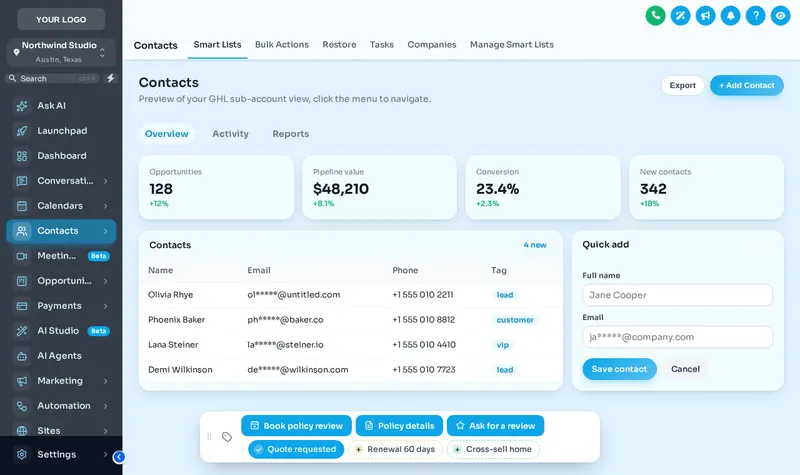
Use the contact actions bar on a sample record
Tap a quick tag, open Policy details to see its form, or drag the bar by its grip. Nothing is saved in the preview.
Loading the live preview
Showing A colour per tag. This is the real contact actions bar. Tap a quick tag, open Policy details to see its form, or drag the bar by its grip. Nothing is saved in the preview; inside GoHighLevel the contact updates at once.
What can a contact action button do?
Add a tag, remove a tag, toggle a quick tag or open a mini form that writes into custom fields. Anything that should happen next, a text, an email, a task, is done by the GoHighLevel workflow that listens for that tag.
| Action | Typical agency use |
|---|---|
| Add tag | Start the policy-review booking workflow |
| Remove tag | Stop a renewal sequence once the policy is renewed |
| Quick tag toggle | Mark quote requested, renewal 60 days, cross-sell home |
| Mini form | Record line of business, X-date and current carrier |
Four buttons a service desk sets up first
Book a policy review
A button that adds a "book policy review" tag; your existing workflow sends the booking link and reminder sequence.
Capture policy details
A mini form for line of business, X-date and current carrier, saved into the contact’s custom fields without opening the edit panel.
Flag a cross-sell
A quick tag such as "cross-sell home" on an auto-only household, picked up by your nurture workflow after the delay you set.
Ask for a review
One click after a smooth claim or a bound renewal adds the review-request tag, so the ask goes out while the moment is fresh.
How to set up the contact actions bar
Switch on the bar
In your design, open Contact actions and turn the bar on. Choose where it sits on the contact record.
Add quick tags
List the tags your team toggles most, such as quote requested, renewal 60 days or cross-sell home, each with its own colour.
Add buttons and mini forms
A button can add or remove tags, or open a short form that writes into custom fields such as line of business or X-date.
Connect your workflows
In GoHighLevel, start workflows from those tags as you already do. The bar just makes the tag one click away.
What is the GHL contact actions bar?
Does it replace GoHighLevel workflows?
Can a button fill in custom fields?
Is this safe for TCPA and consent tags?
Where does the bar appear on screen?
Does it work with the Insurance Snapshot tags?
Which package includes the contact actions bar?
Is anything saved when I click in the preview?
Other endorsements on the same account
- Themes, UI kits and dark modefrom Essential Cover
- Login page designsfrom Essential Cover
- Dashboard designsfrom Full Cover
- Pipeline board designsfrom Full Cover
- Menus and navigationfrom Full Cover
- Calculatorsfrom Premium Policy
- Popupsfrom Premium Policy
- Notifications and social prooffrom Premium Policy
- Floating widgetsfrom Premium Policy
- Packages and pricingall three schedules
- GoHighLevel dashboard theme overviewstart here
Insurance Snapshot for GHL is independent and is not affiliated with, endorsed by or sponsored by HighLevel, Inc. GoHighLevel and HighLevel are trademarks of their owner. The GHL Customizer adds your own CSS and JavaScript on top of GoHighLevel through its Custom JS and CSS settings; it does not change HighLevel’s software. We are not an insurance carrier, broker or producer, and nothing on this page is insurance, legal or compliance advice.
Make the next step one click away
Full Cover includes the contact actions bar, dashboards, pipeline boards and menus, on top of every theme, for $537 once.
One-time payment, lifetime access. Login emailed within minutes (max 24 hours). Secure card payment by Stripe.