
GoHighLevel sidebar menu styles that shorten the walk
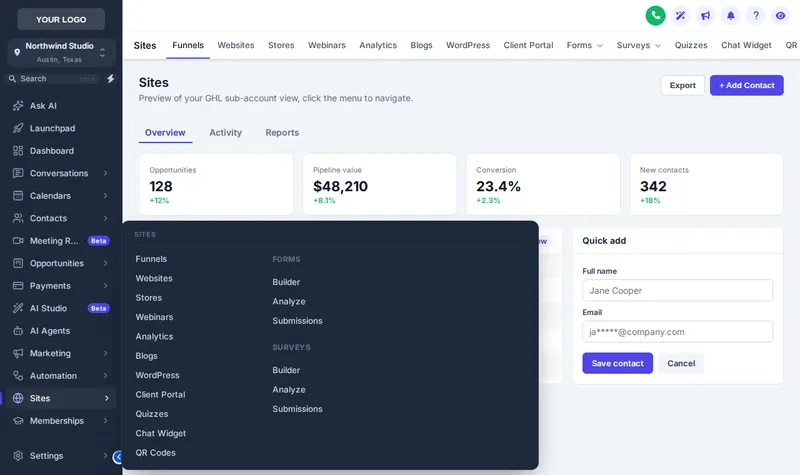
CSRs open the same six screens all day. The customizer’s GoHighLevel sidebar menu styles move the menu where it suits your screens, fold long sections into mega menus and float a quick menu over every page.
What can you change in GoHighLevel navigation?
Where the menu sits, how sub-menus open, how the header looks, and whether a quick menu floats over every page. What each user is allowed to open is still decided by GoHighLevel.
Choose the layout
Left sidebar, right sidebar, top bar or a top bar merged with the header.
Pick sub-menu and header styles
Plain lists or one of 8 mega-menu styles; one of 8 header styles and, for top bars, 8 bar styles.
Add the quick menu
Optionally switch on the floating quick menu (3 layouts, 8 designs) with the pages your team opens most.
Try every menu layout and mega-menu style
Choose a layout, then a mega style and hover Sites inside the frame. Top-bar styles appear when you pick a top-bar layout.
Every navigation style in the editor
Mega-menu styles (8)
- Columns: Everything at once
- Split: List left, menu right
- Cascade: Hover an item, menu opens beside
- Tiles: Icon cards, click to open
- Tabs: Items as tabs, menu below
- Icon rail: Slim icons + menu
- Accordion: Expands in place
- Wide: Full-width band
Header styles (8)
Top-bar styles (8)
Floating quick menu
3 layouts and 8 designs.
The floating quick menu
A glass dock over the contacts page to start; switch to the bubble or the side rail and drag it by its grip.
Can you change the GoHighLevel sidebar menu?
What is a mega menu in GoHighLevel?
What is the floating quick menu?
Will hiding or moving menu items break permissions?
Is a top-bar layout better for an insurance office?
What are announcements?
Which package includes menus and mega menus?
Can sub-account users adjust the menu themselves?
Other endorsements on the same account
- Themes, UI kits and dark modefrom Essential Cover
- Login page designsfrom Essential Cover
- Dashboard designsfrom Full Cover
- Pipeline board designsfrom Full Cover
- Contact actions barfrom Full Cover
- Calculatorsfrom Premium Policy
- Popupsfrom Premium Policy
- Notifications and social prooffrom Premium Policy
- Floating widgetsfrom Premium Policy
- Packages and pricingall three schedules
- GoHighLevel dashboard theme overviewstart here
Insurance Snapshot for GHL is independent and is not affiliated with, endorsed by or sponsored by HighLevel, Inc. GoHighLevel and HighLevel are trademarks of their owner. The GHL Customizer adds your own CSS and JavaScript on top of GoHighLevel through its Custom JS and CSS settings; it does not change HighLevel’s software. We are not an insurance carrier, broker or producer, and nothing on this page is insurance, legal or compliance advice.
Fewer clicks between a call and the right record
Full Cover adds mega menus, header styles, the floating quick menu and announcements, with dashboards and boards too, for $537 once.
One-time payment, lifetime access. Login emailed within minutes (max 24 hours). Secure card payment by Stripe.